We have compiled a list of manufacturers, distributors, product information, reference prices, and rankings for Simple Browser.
ipros is IPROS GMS IPROS One of the largest technical database sites in Japan that collects information on.

Simple Browser - List of Manufacturers, Suppliers, Companies and Products | IPROS GMS

Simple Browser Product List

1~2 item / All 2 items

Displayed results

Simple Browser ver.3

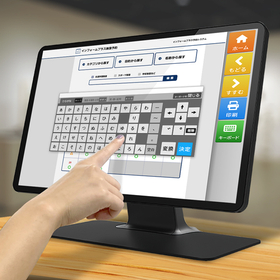
Browser for kiosk terminals and digital signage. Allows for detailed settings required for unattended terminals. Widely adopted in stores and public facilities.

【Free and Easy-to-Use Buttons】 A simple browser designed for kiosk terminals with a focus on streamlined functionality. It offers comfortable touch panel screen operation with large buttons. The layout of the buttons, displayed text, and links can be freely configured. 【Smooth Operation of Unmanned Terminals】 Equipped with essential features for unmanned terminals, such as full-screen display of web applications, restrictions on access URLs, automatic page return function, and hiding dialogs during printing. 【Easy Configuration Screen】 Settings for the simple browser are done through a configuration tool. You can easily set up button link settings, allowed/blocked URLs, printing messages, and more. It has been designed to be easy to configure even for those who do not understand programming. 【User-Friendly Software Keyboard】 When a text area is selected, the software keyboard automatically pops up for text input. You can close the keyboard when it's no longer needed or force it to appear with a button. 【Digital Signage When Not in Use】 When not in use for a certain period, it can automatically switch to a slideshow. This can be used for displaying advertisements and other information, effectively utilizing the screen when not in use.

  • Other PCs and OA equipment
  • Other information systems
  • Software (middle, driver, security, etc.)
  • Simple Browser

Added to bookmarks

Bookmarks list

Bookmark has been removed

Bookmarks list

You can't add any more bookmarks

By registering as a member, you can increase the number of bookmarks you can save and organize them with labels.

Free membership registration

Simple Browser Chromium

A dedicated browser that allows you to "safely operate" only specific sites. It completely blocks pranks and accidental operations.

Do you have any of these concerns with touch panel terminals in public facilities or stores? "With the standard browser, links can lead to other sites." "There is no back button, causing operations to stop." "The browser closes on its own." The Simple Browser Chromium solves these unique challenges of unattended terminals and enables comfortable web operations. ■ Enhanced display speed and technology with Chromium It uses the same engine as Google Chrome and others. It supports the latest web technologies, improving display speed. Guidance pages and reservation systems can be displayed smoothly without stress. ■ Safe and convenient features specialized for unattended operation - Full-screen display & access restrictions: Hides the desktop and displays only permitted sites. - Simple button settings: Place operation buttons like "Back" and "Home" on the screen. Text and links can be freely configured. - Smooth input operations: Automatically displays the software keyboard when selecting an input area. - Signage function: Includes a feature to return to the home screen when idle and plays a slideshow. With easy configuration through the setup tool, it can be operated as a safe and user-friendly dedicated terminal right after installation.

  • Other PCs and OA equipment
  • Other information systems
  • Software (middle, driver, security, etc.)
  • Simple Browser

Added to bookmarks

Bookmarks list

Bookmark has been removed

Bookmarks list

You can't add any more bookmarks

By registering as a member, you can increase the number of bookmarks you can save and organize them with labels.

Free membership registration